UX BRAINSTORMING CASE STUDY
How I Turned a Messy Idea into a Structured Acelab Template (Collections)
Project: Acelab Collections Framework
Teams Involved: CX-AECO
This page walks through my brainstorming and UX research process for rethinking how Acelab Templates work. The goal was not to design a finished feature, but to move from an unstructured idea to a clear, defensible concept grounded in user behavior, data, and system constraints.
Role: As the Director of Material Research at Acelab, I led the UX brainstorming and concept development to address a recurring issue with pilot projects and templating. I collaborated closely with our Material Research Specialist who directly supports our Firm Library Implementations. Through this work, we identified that the existing sample template caused early drop-off rather than momentum. Preloaded products were often ignored or deleted, slowing pilot projects and making it harder for firms to move forward quickly. My role was to frame this challenge from a UX research perspective, synthesize internal trend data from past library implementations, and guide the development of a sector-based collection model that replaced generic templates with more intentional, data-informed starting points. This effort involved cross-functional collaboration with CX-AECO, Product, and Partnerships to ensure the concept aligned with real user behavior, platform constraints, and downstream business goals.
STEP 01: Starting with Raw Thinking
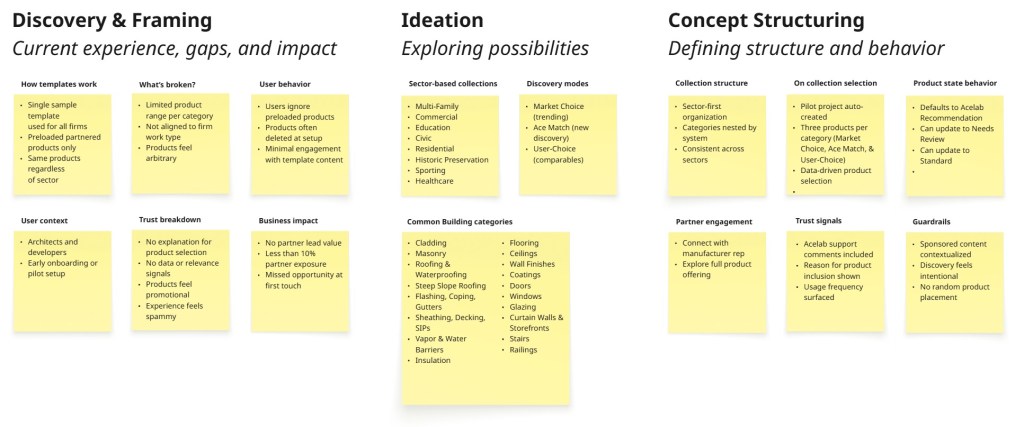
I started with a raw whiteboard sketch to externalize the problem. This helped surface gaps in the existing template experience, early assumptions, and overlapping ideas before trying to impose structure.

Step 02: Translating Ideas into a UX Framework
After capturing initial thoughts through a loose whiteboard sketch, I shifted focus to separating observations from assumptions. I mapped the current Material Hub pilot project workflow, explored what a revised user flow could look like, and used those insights to identify potential features and define how they should be structured within the platform.
Step 03: Defining Categories Through Building Logic
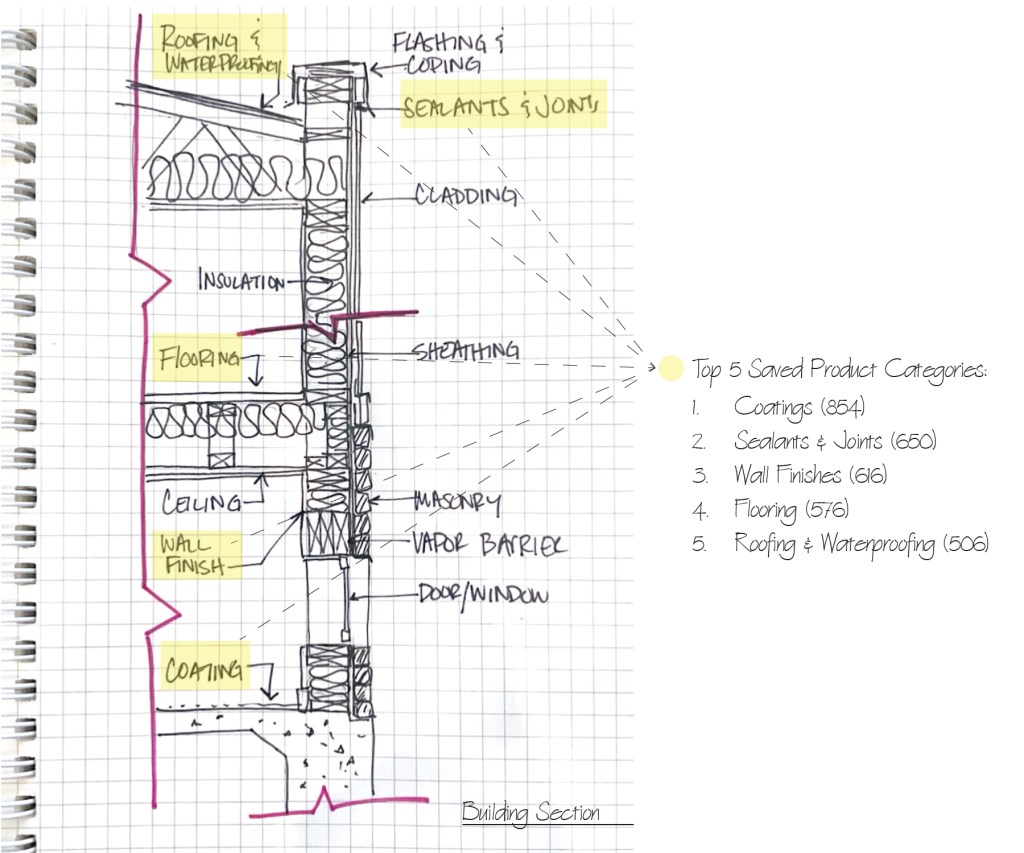
To determine which categories should anchor the template collections, I began by sketching a standard exterior building section to ground the work in how architects naturally think about systems and assemblies. Using insights from past firm library implementations, we highlighted categories that consistently appeared across projects. To validate these observations, I ran an internal analysis of Acelab’s saved product data to identify the most frequently saved categories, reinforcing the initial patterns we observed and ensuring the resulting taxonomy was rooted in real user behavior rather than abstract classification.
Step 04: Converging on a Clear Structure
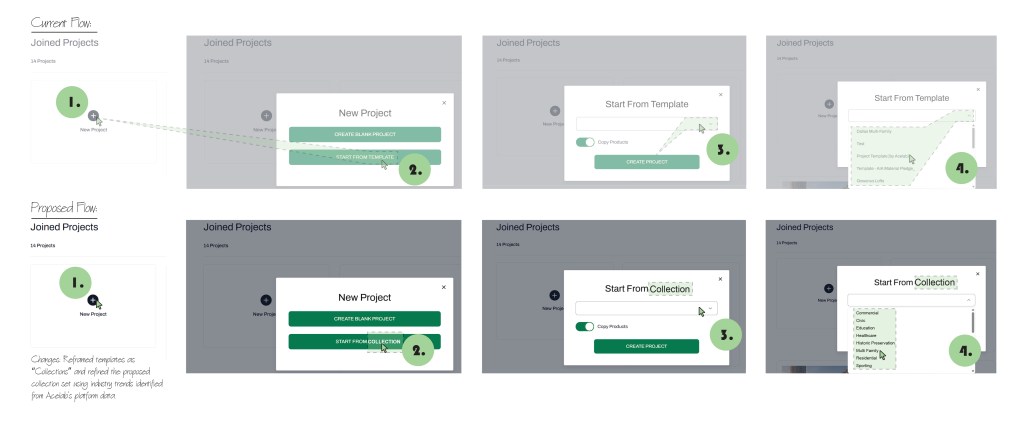
At this stage, I examined the existing flow for creating template projects, including how users navigate available templates and make initial selections. This review highlighted gaps in clarity and relevance that contributed to early drop-off during pilot setup. Based on these findings, I converged on a sector-based collection structure, defining how collections are organized and accessed. The proposed sketches illustrate a shift from “Templates” to “Collections,” along with an updated sector-based dropdown that creates a clearer and more intentional entry point into material selection.
Step 05: Making the Concept Tangible
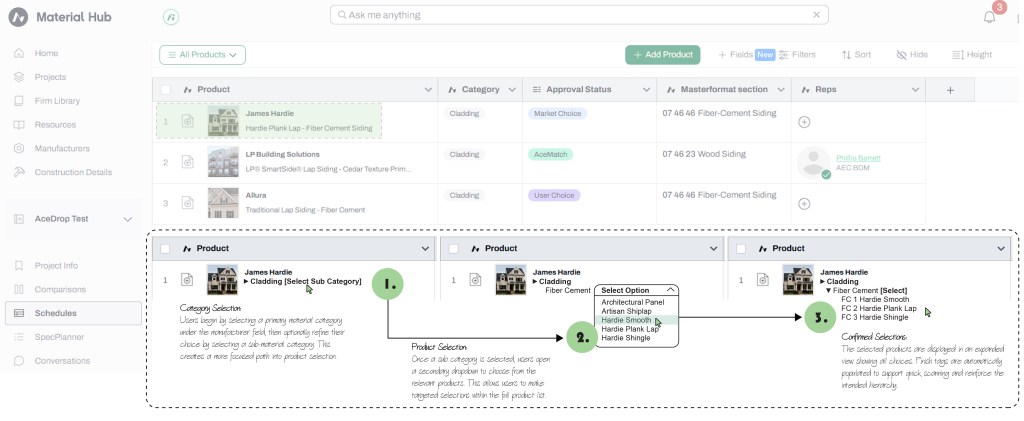
High-fidelity wireframes were used to explore the shift from the current product-driven Schedule experience to a more structured, category-driven selection model within Collections. This work helped surface gaps in the existing flow, including inconsistent finish tagging and the lack of clear grouping when selecting multiple products. By organizing selections first by general material categories, with optional subcategories for added specificity, the proposed structure improves clarity and scanability while maintaining flexibility.
As part of the Collection experience, pilot projects are preloaded with products based on industry-driven trends for each project sector. Market Choice and AceMatch selections are populated upfront to help teams get started, while User-Choice options are added later for comparison once firms share their project standards with the Library Implementation team. This approach balances guided setup with firm-specific input, allowing collections to evolve alongside the project.
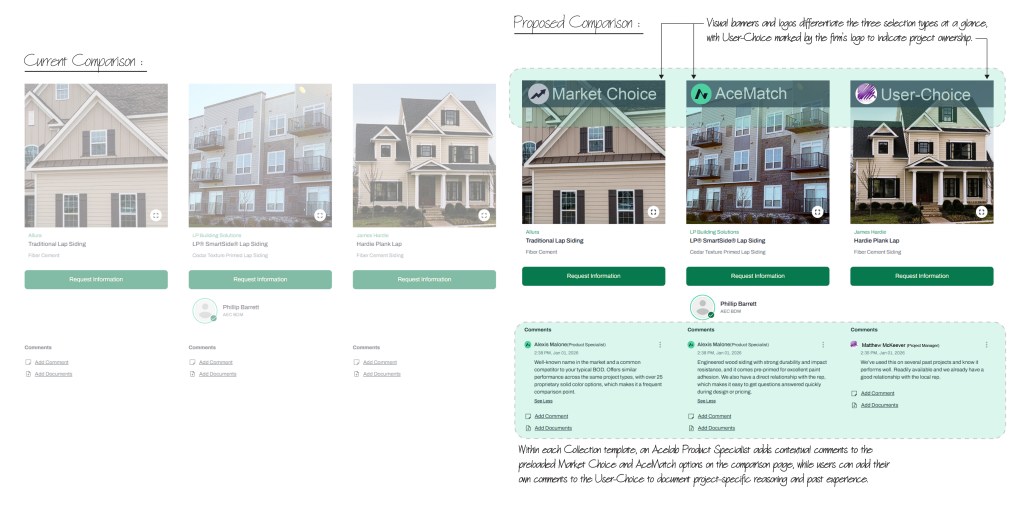
Product Types:
- Market Choice
- A product option based on the user’s initial selection that identifies both a trending and commonly specified alternative product. This helps users understand what the broader market is choosing in similar projects.
- AceMatch
- An Acelab recommended product from a partnered manufacturer that meets the user’s requirements. AceMatch often introduces newer products or manufacturers the user may not yet be familiar with, supporting informed discovery beyond standard selections.
- User-Choice
- A basis of design product the firm has used across past projects. This option reflects established firm preferences and provides continuity with historical standards.
Why Collection Brainstorm Session Matters?
- Reduces setup friction during onboarding
- Improves trust through transparency
- Creates value for both users and paid partners
- Scales across sectors without feeling generic
Current Project Status: We have narrowed down which partnered products are strong candidates for AceMatch selections based on sector and building category. In parallel, we are reviewing past firm library implementations to determine which products are best suited for Market Choice selections.
For User-Choice, we are evaluating whether this remains an open selection for users to add themselves or is added by the Library Implementation team by carrying over relevant Basis of Design selections from a firm’s existing library.
Next steps include collaborating with the CX-Partners team to work with manufacturers on capturing clear value propositions in Acelab Support comments, explaining why products are relevant and selected in each collection. As the collections mature, we plan to partner with Product and Engineering to introduce tooltip-style interactions that display trend-based statistics for Market Choice products.
Longer-term exploration includes giving users the ability to indicate products they have personally used and vouched for, with reviews surfaced in forum discussions and reflected on product detail pages.

 ALEXIS J MALONE