Material Hub: acedrop
Project: Scaling Firm Libraries
Teams Involved: CX-AECO, Data, Product, & Engineering
Role: As the Director of Material Research, my role was to design and oversee the transformation of the Firm Library process at Acelab. Having worked directly on manual uploads and customizations for over six months, I understood the intricacies and pain points of the system. My challenge was to create a strategic plan to scale the firm libraries, ultimately improving the implementation timeline from 2 weeks to 1 day. This effort required close cross-functional collaboration between CX-AECO, Data, Product, and Engineering teams. I developed a comprehensive integration plan broken into five key stages: S1 Data Breakdown, S2 Smart Extraction, S3 Database Sync, S4 Automated Upload, and S5 Tailored Customization. Currently, I oversee the accuracy of S1 and S2, while the Data team works on S3-S4, and the final stage, S5, is handled by my team.
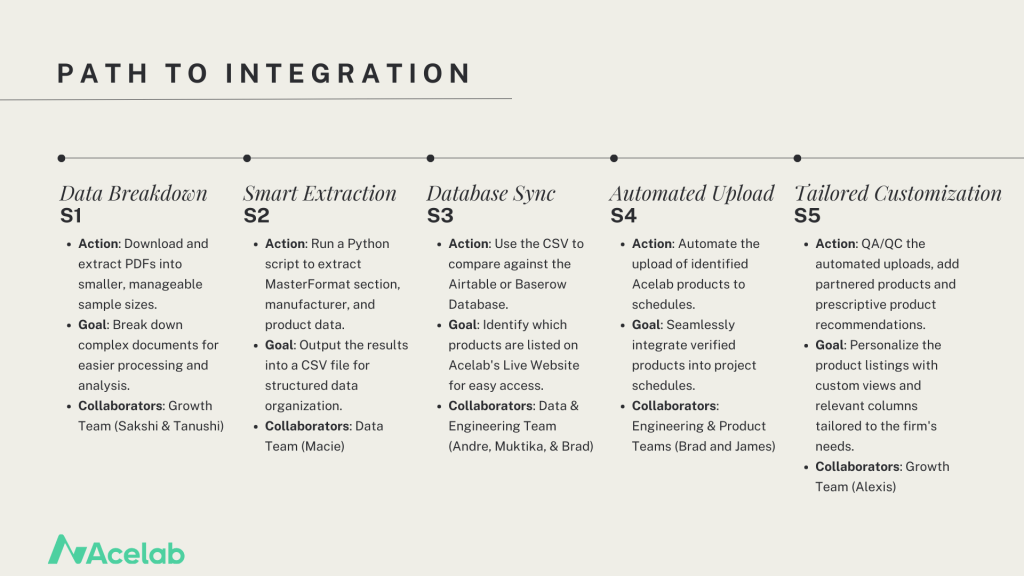
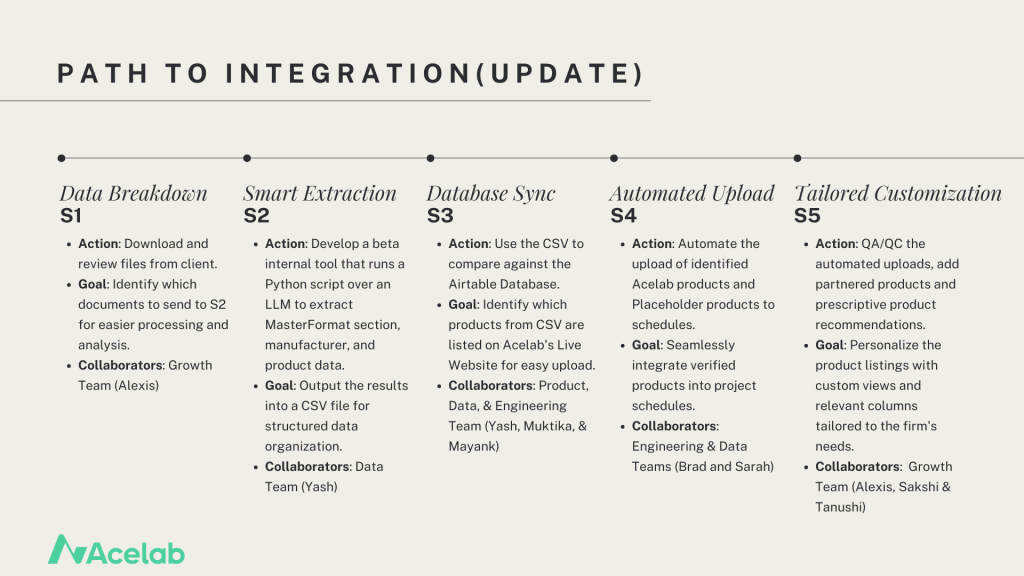
Process: The current product upload process is a manual operation managed by the Library Implementation team. The team creates schedules by building categories and adding products, which include both Acelab’s live products available on the website and placeholder products—those missing data that the team manually creates until the full product details are available. Previously, with a single person handling this process, 2-3 Firm Libraries were developed weekly, with an average of 100-150 products per library. Now, with a team of six, we are able to add 3-4 times the number of products, resulting in a more comprehensive Firm Library. The team’s manual search and addition of products has laid the foundation for scaling the implementation process using AI tools and automation currently under development.
Challenge Statement: The firm library upload process, while essential for streamlining our material research, was hindered by a slow implementation timeline. A key challenge was reducing the time required to generate a firm’s custom material library from two weeks to one day. Additionally, the process lacked a scalable solution that could accommodate different types of input documents and provide consistent, curated results. To meet this challenge, a more efficient, automated system was needed without sacrificing the level of customization that our clients expect.
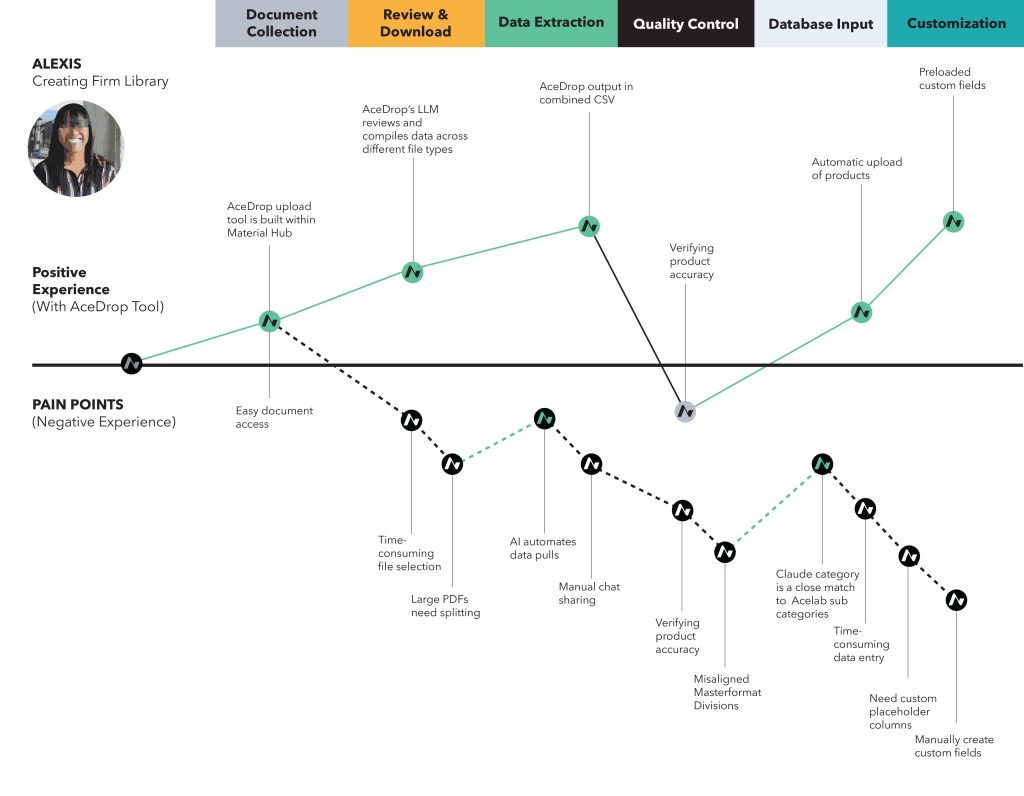
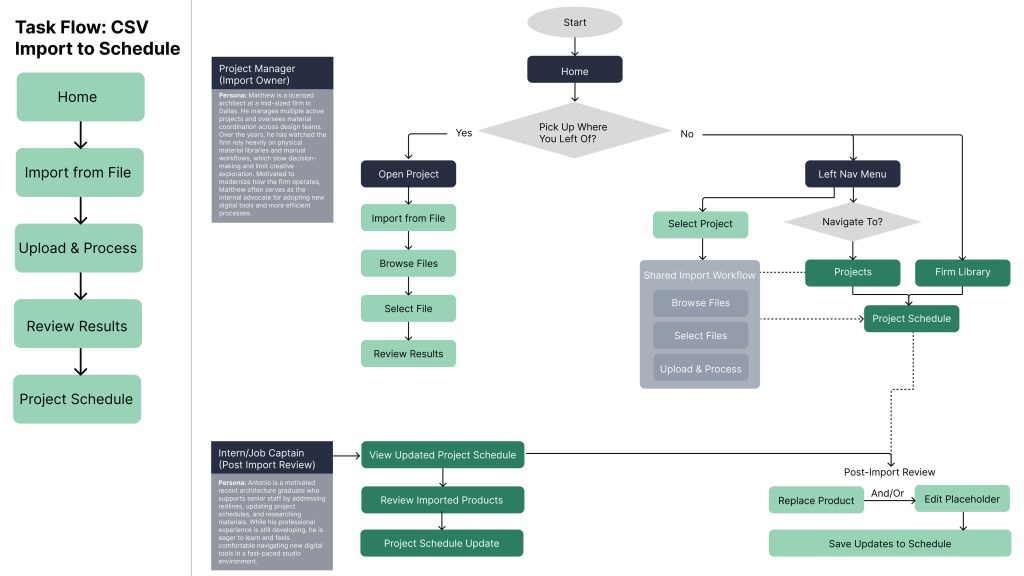
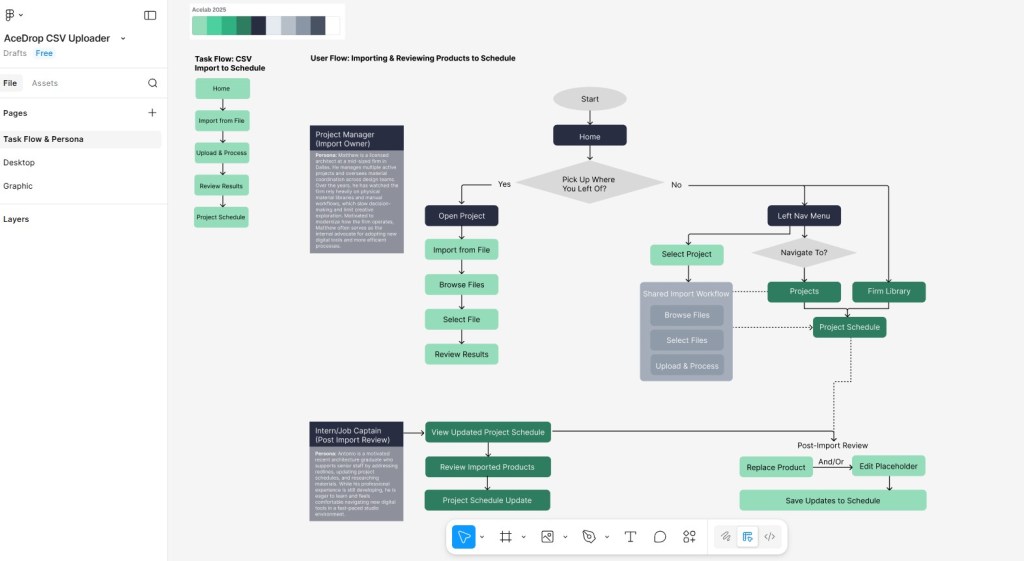
Task Flow vs User Flow: A key focus of this project was separating user intent from interface-driven behavior. By mapping the Task Flow alongside the User Flow, I identified where the current experience required users to adapt to the product rather than the product supporting their work, resulting in avoidable inefficiencies. The Task Flow further outlines the essential steps required to successfully upload structure product data to Material Hub, while the User Flow illustrates how two personas navigate the product to prepare and import files into Schedules, highlighting key decision points introduced by the proposed interface.
Affinity Diagrams: Based on feedback from seven architectural professionals, ranging from mid-level Job Captains to licensed Project Managers, the top-rated categories were Search & Filtering, Data Entry & Standardization, and Integration & Customization. These interconnected areas emphasize that structured data is key to improving search accuracy, enabling customizable templates, and automating processes like folder auto-load. Enhanced search tools improve user experience, while integration features, such as project management links and custom finish options, support scalability and diverse workflows. Together, these priorities ensure the firm library is intuitive, efficient, and adaptable.
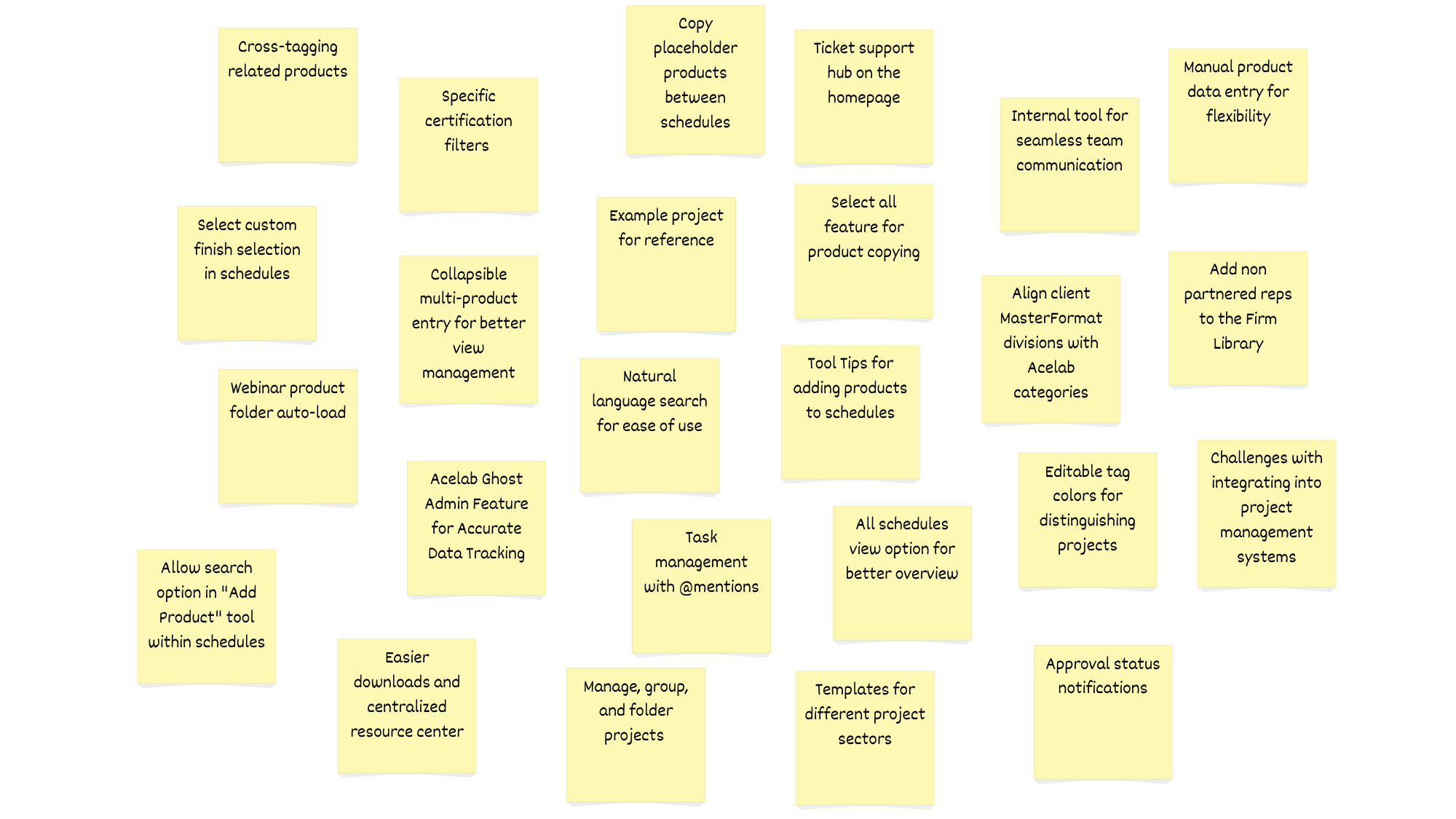
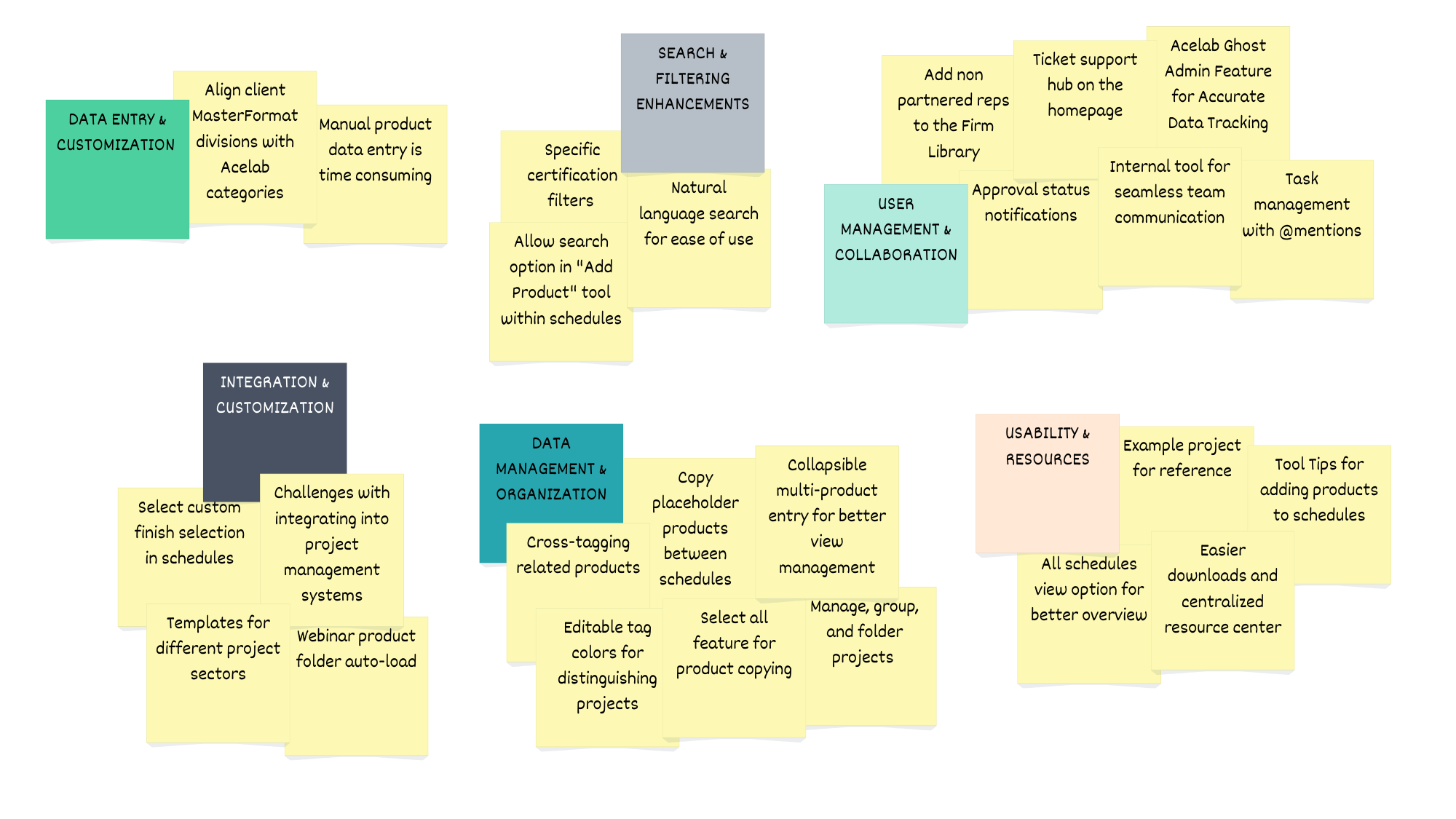
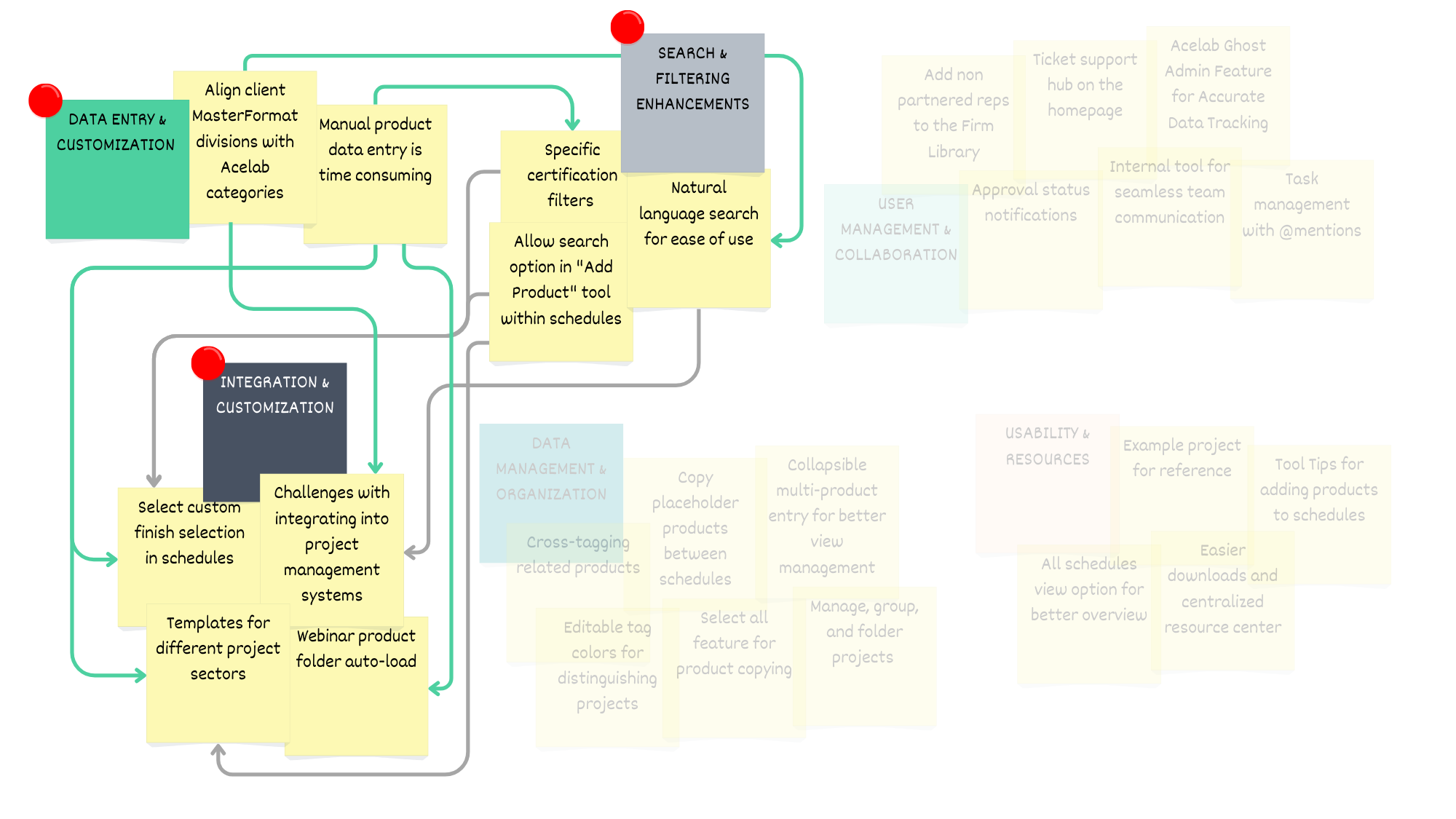
Affinity Diagram Analysis: The feedback from participants led the team to prioritize three main features that directly address the primary pain points of manual entry, inconsistent data, and usability challenges, while also supporting the scalability of the Acelab firm library. These features enhance user engagement by reducing friction in workflows and providing a more intuitive, automated experience.
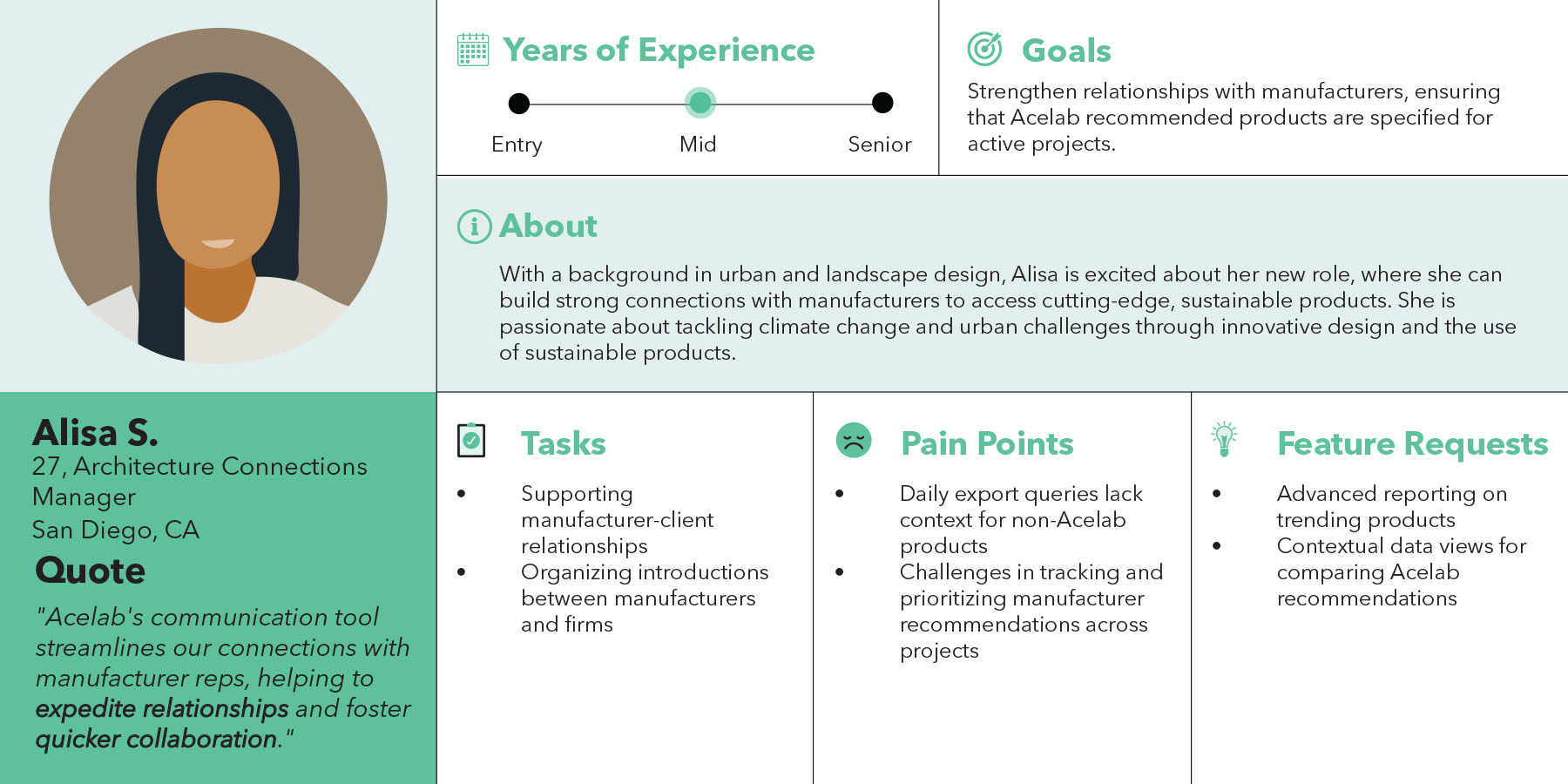
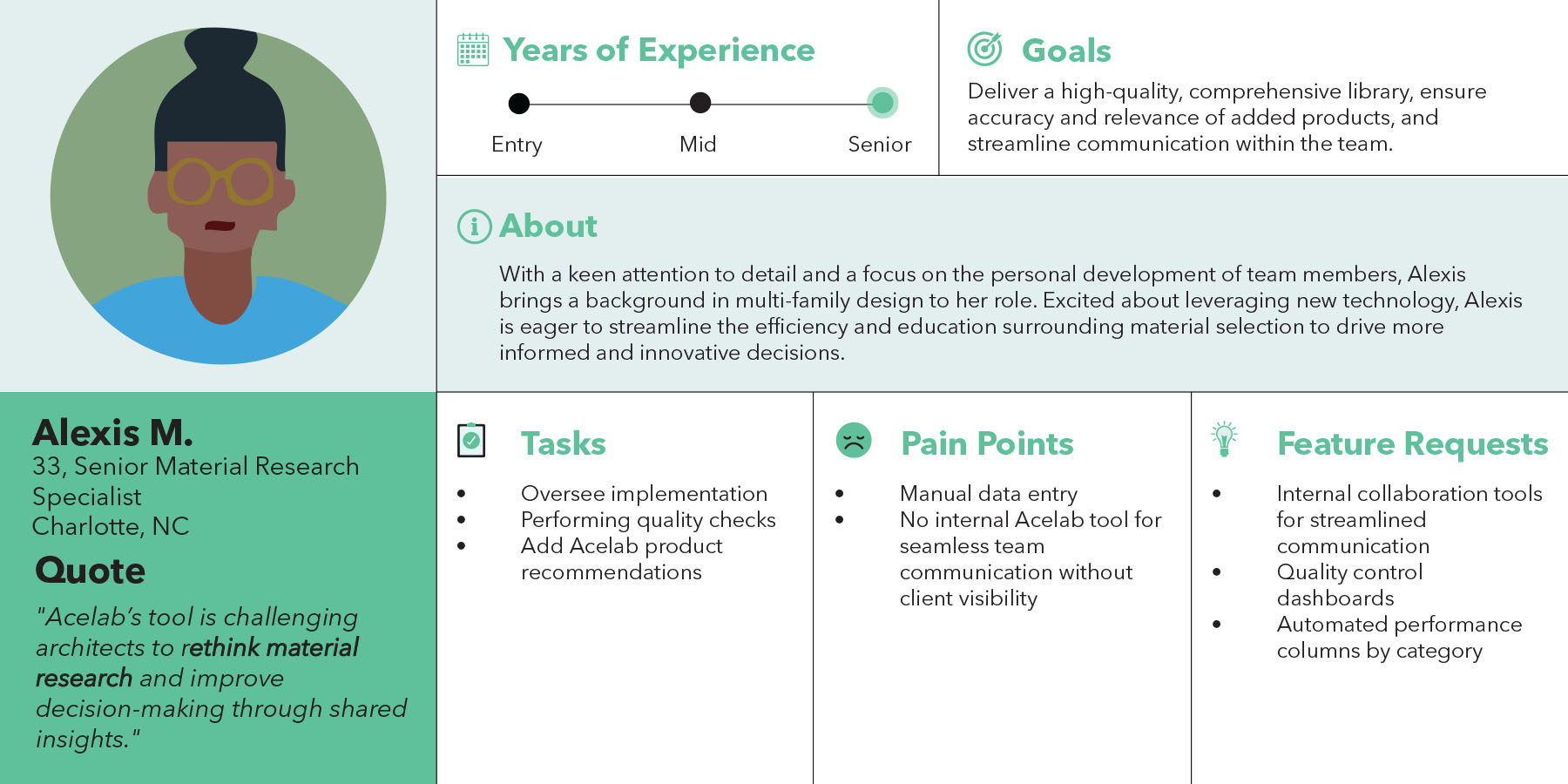
Architecture Firm User Personas: Womack + Hampton Architects is a mid-sized architecture firm based in Dallas, TX, specializing in market-rate multi-family apartments. The firm has partnered with Acelab to transition from a traditional physical material library to a streamlined digital platform. This transformation enhances their material decision-making process by providing easy access to an organized, searchable database, enabling more efficient selections, faster approvals, and improved collaboration. With Acelab, the firm is now equipped to make informed, data-driven material choices for their projects, ensuring quality and consistency in their designs.
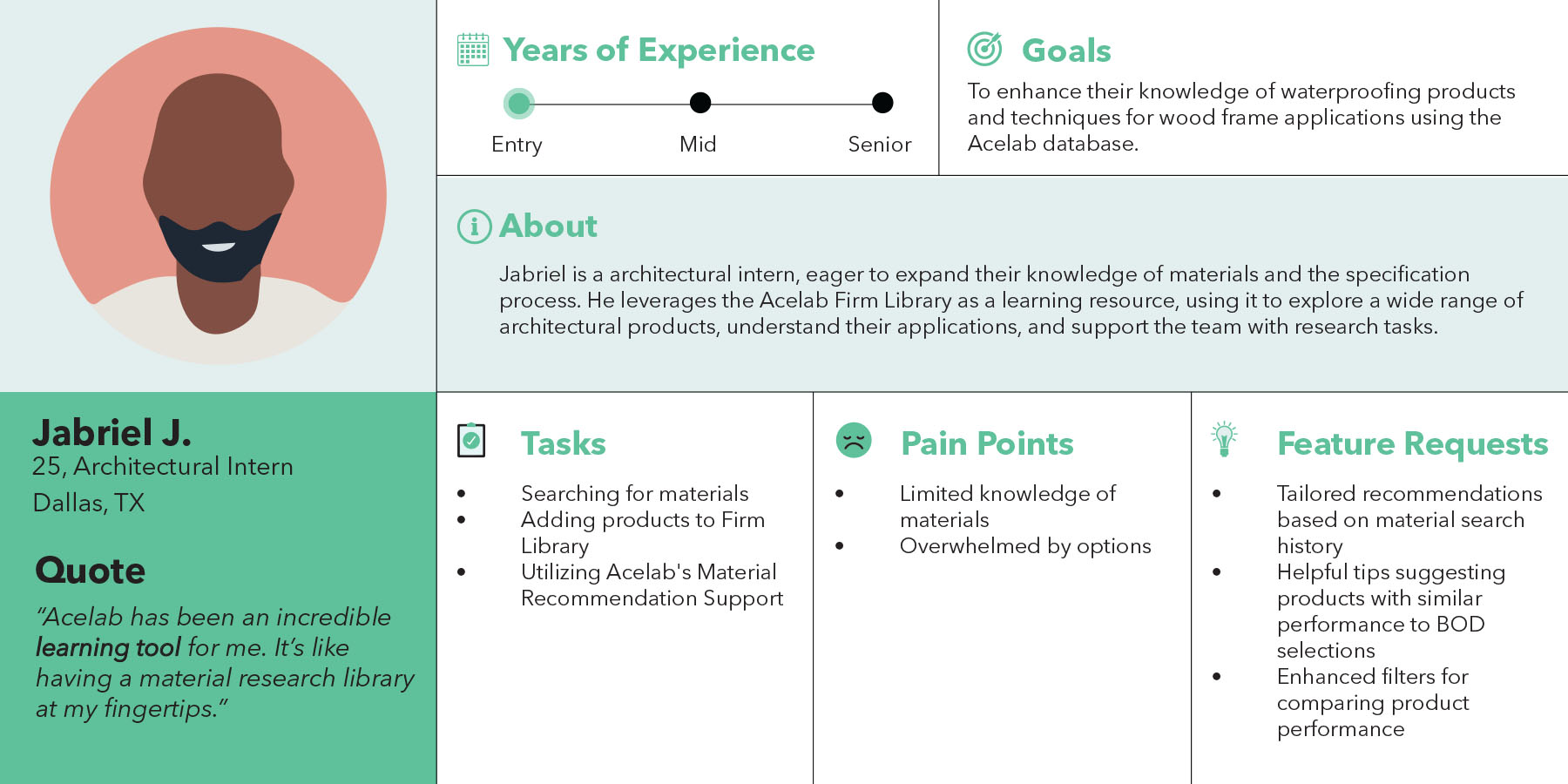
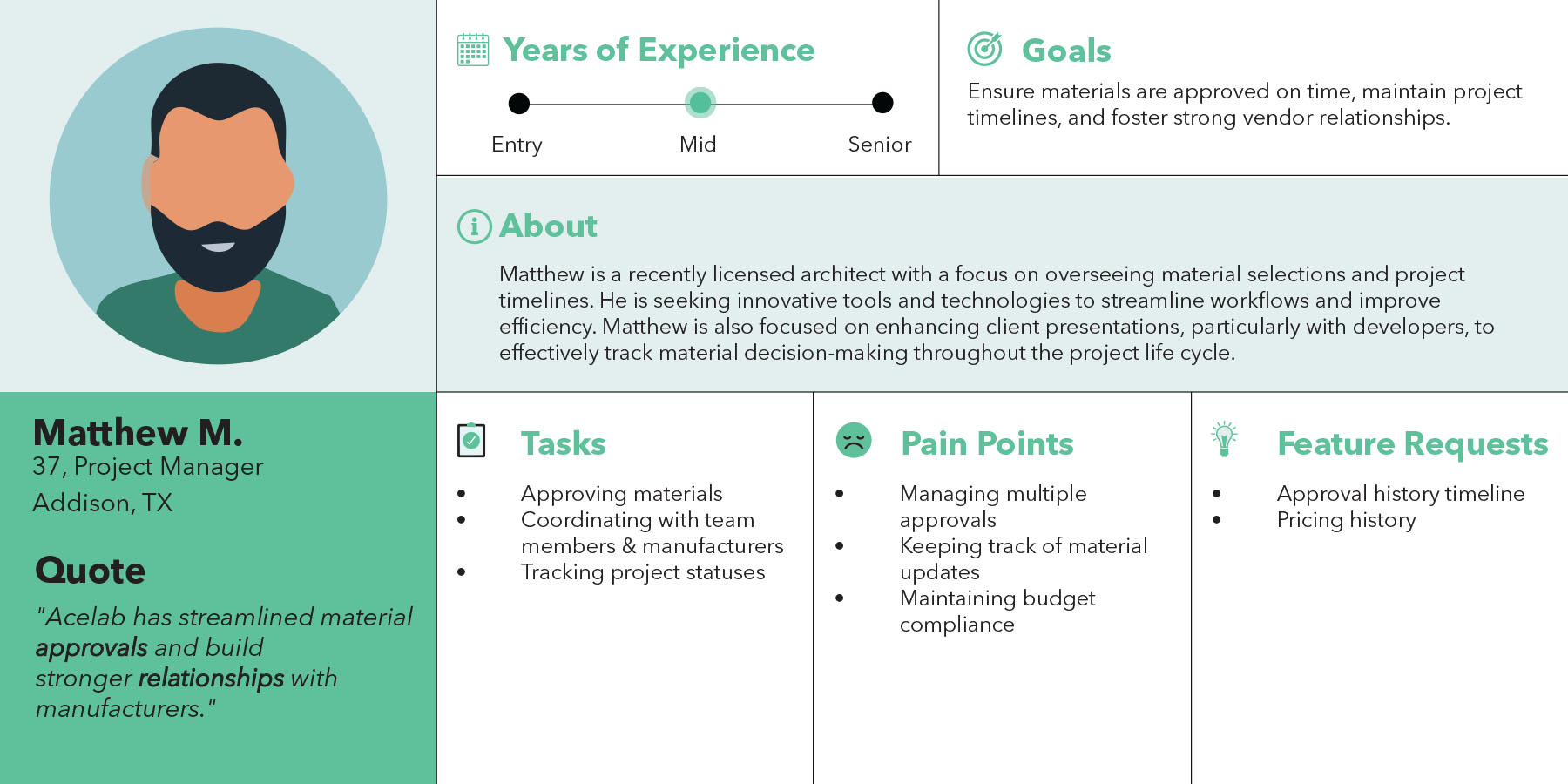
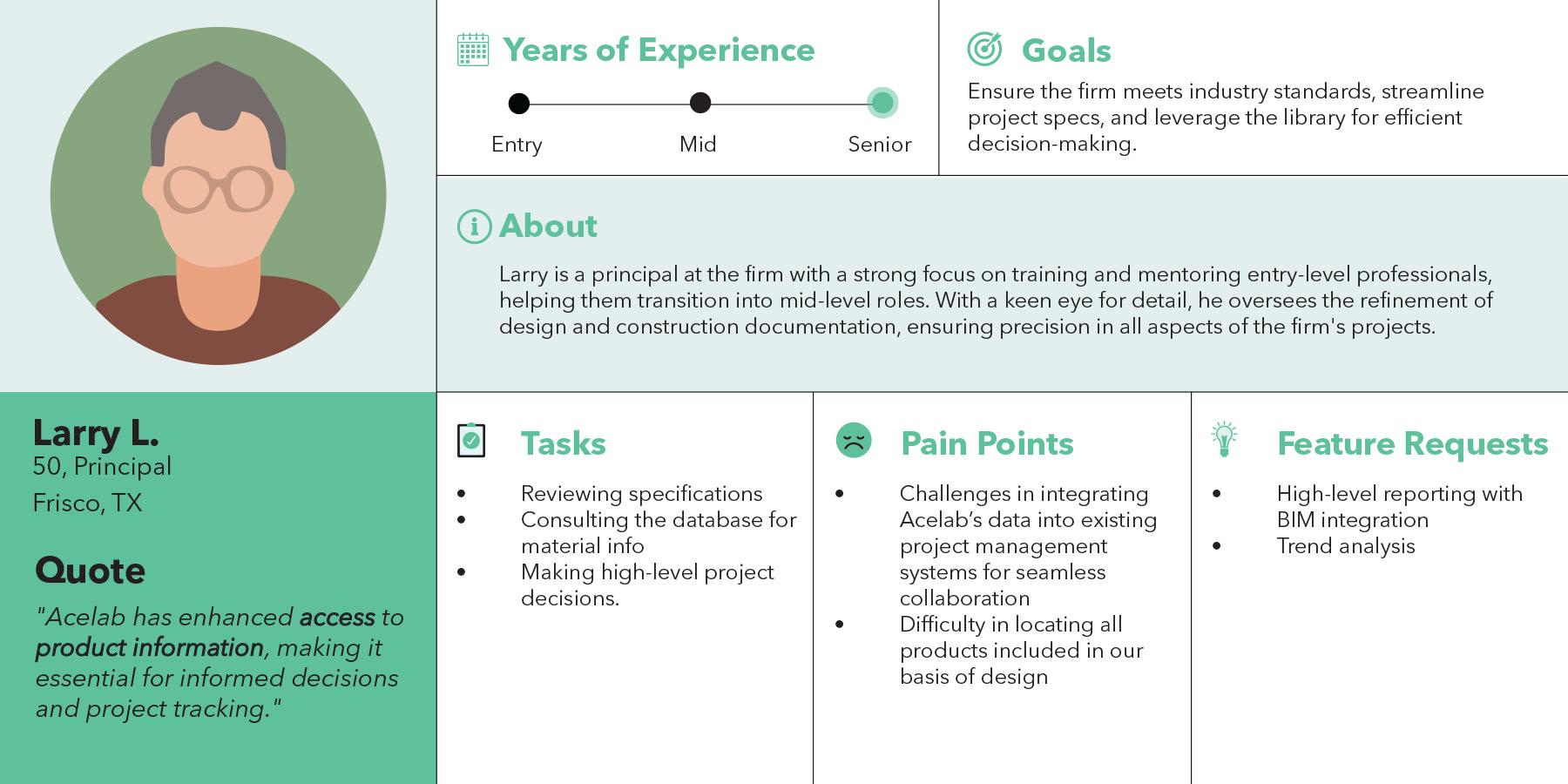
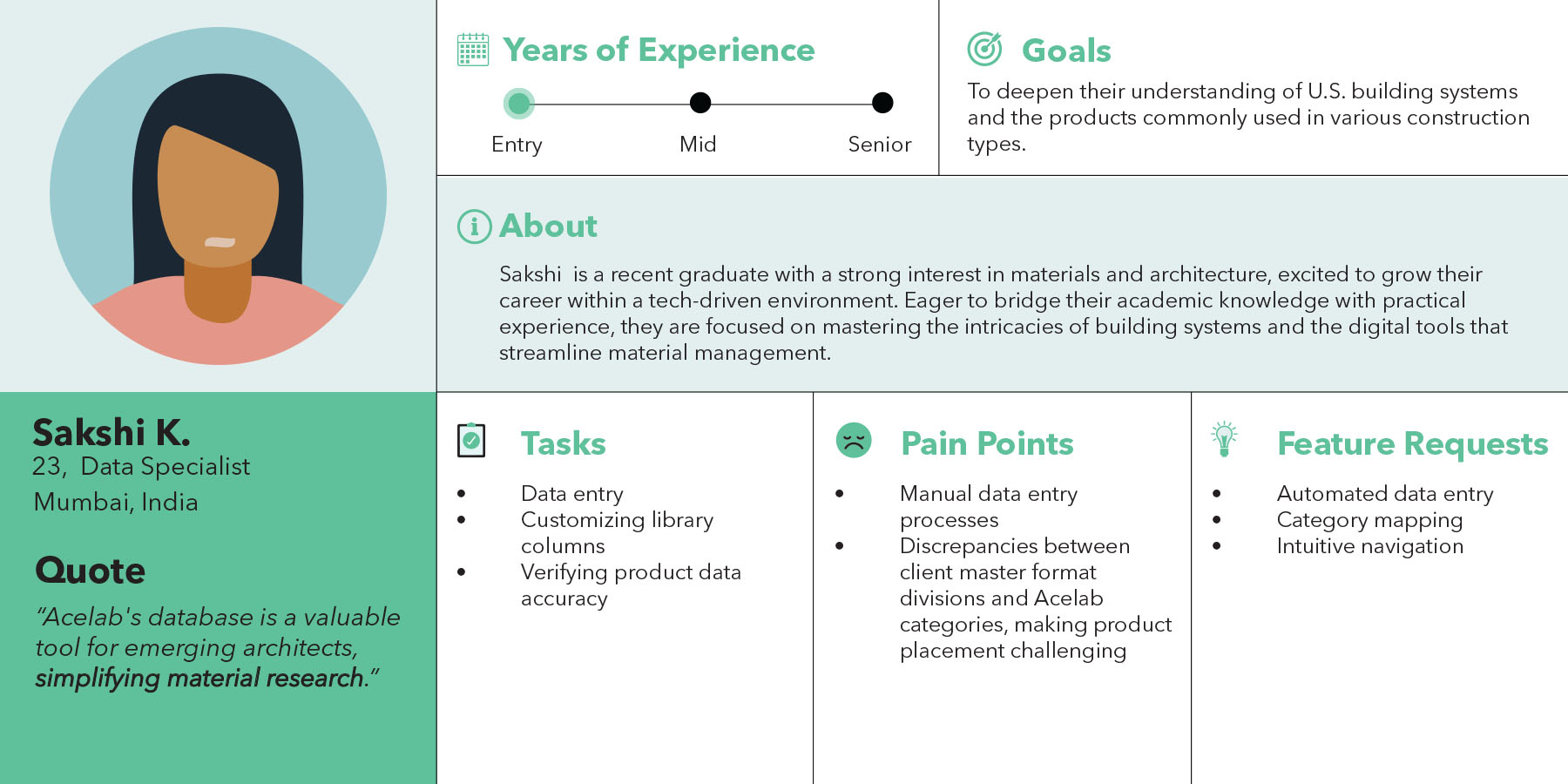
Acelab Team User Personas: The Library Implementation Team consists of internal super users responsible for developing and optimizing the firm library for clients. With deep knowledge of the software, they play a crucial role in shaping the user experience by offering valuable insights into user behavior, identifying feature requests, and reporting engineering bugs. Their expertise allows them to guide the integration of new features and improve existing functionalities, ensuring the library aligns with client needs and enhances material decision-making. This team is vital in bridging the gap between the product development team and end users, driving continuous improvements for a seamless experience.
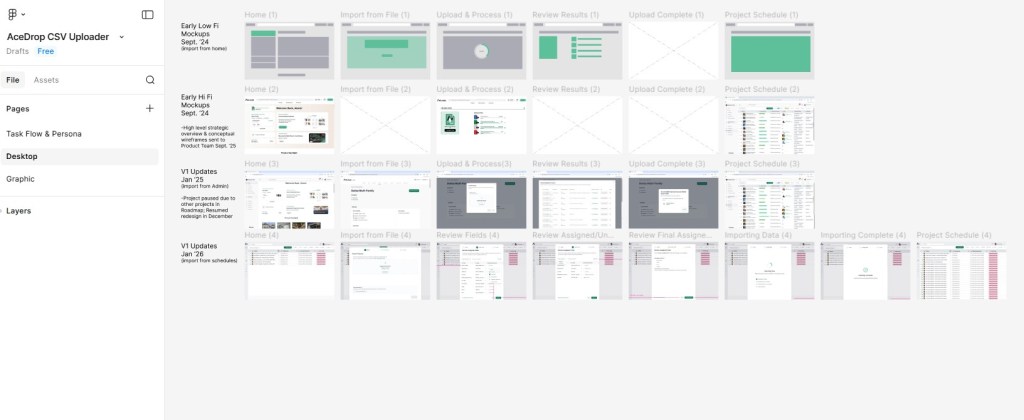
Design Organization & Working Figma File: My Figma workspace was intentionally organized into two primary pages to reflect both user understanding and design evolution. The first page focuses on task flows and user personas, using flow diagrams and Acelab’s brand colors to clearly communicate user intent and core behaviors. The second page documents the project’s progression over time, capturing how designs evolved as team structure, staffing, and priorities shifted. Together, these pages show not only the final outcomes, but the thinking, tradeoffs, and iteration that shaped the work.
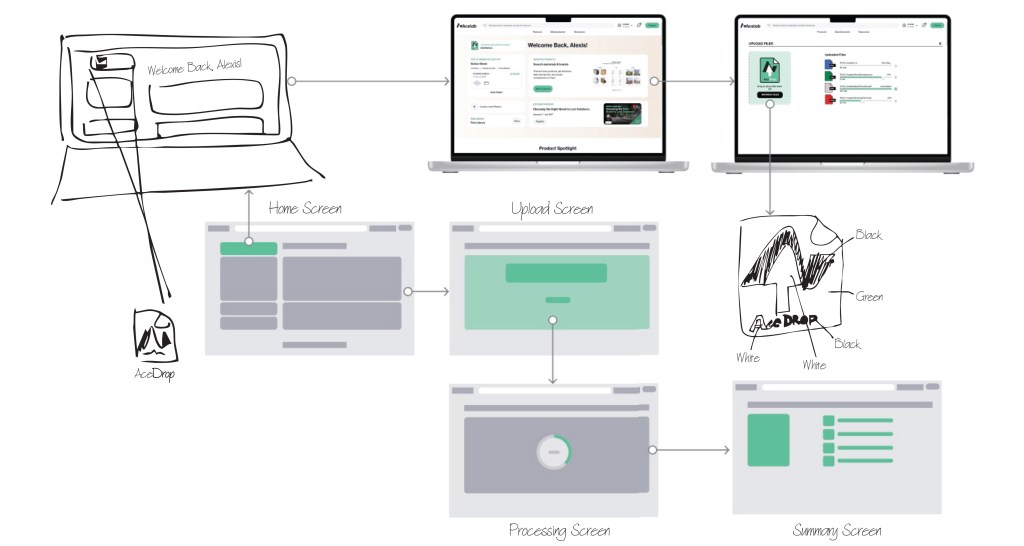
Early Design: AceDrop allows users to upload files which are converted into a CSV file, which is then cross-referenced with Acelab’s internal database to seamlessly add products to the firm’s digital library. The wireframe flow illustrates the user journey, from selecting the upload option to processing and reviewing the files, ensuring a smooth and efficient integration process.
Brainstorm Prototype: The AceDrop prototype was developed to address user pain points in the document upload process, focusing on simplifying navigation and enhancing efficiency. By allowing users to easily drag and drop documents, the tool streamlines the upload journey, providing an accessible and expedited way to build a comprehensive firm library of logged products.
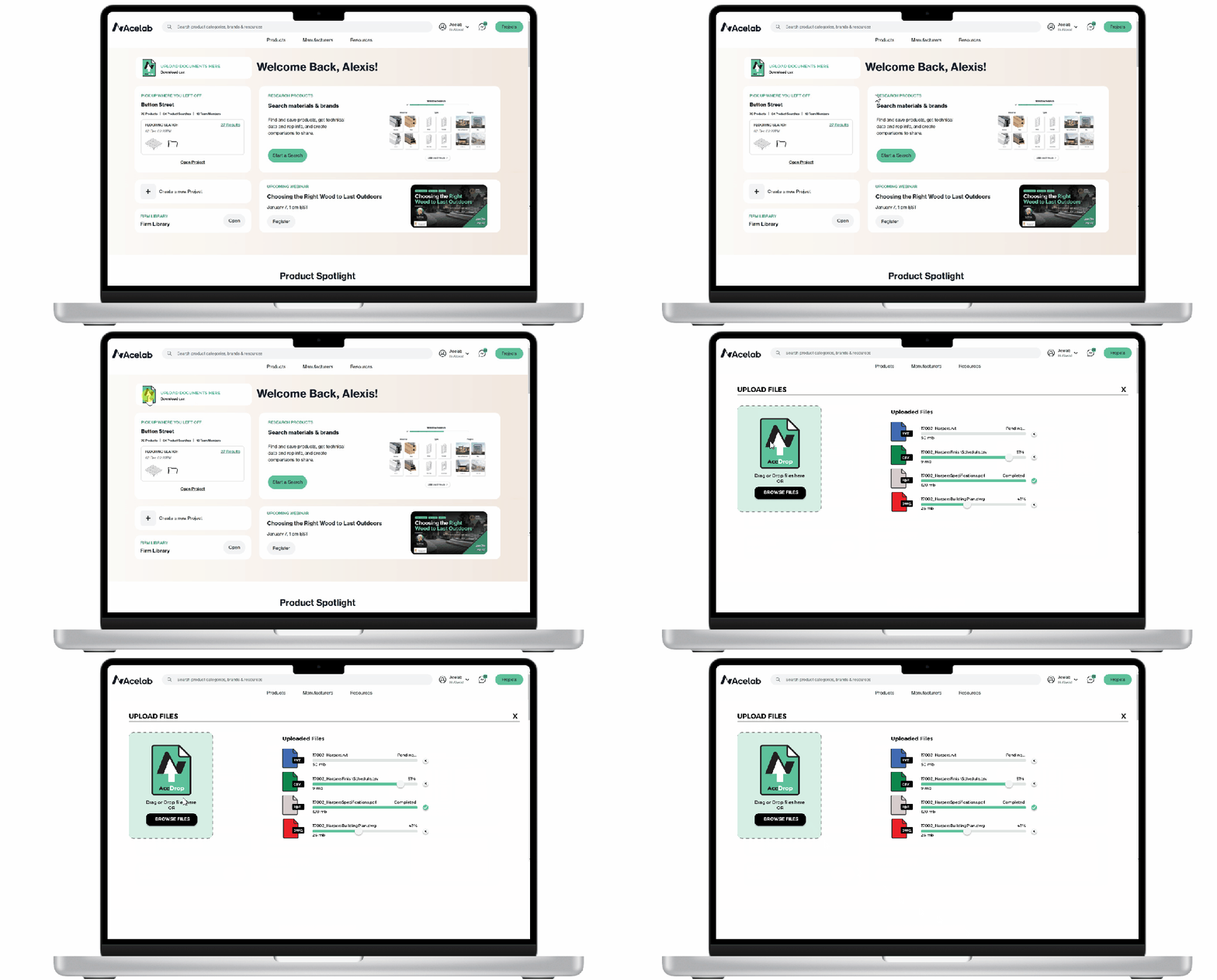
Proposed Solution: To address these challenges, I proposed the development of a new upload tool called AceDrop. This tool allows clients to easily drop in their files, which are then processed to produce a curated Acelab Library. AceDrop’s primary feature is its ability to automatically capture manufacturers and products from client documents, streamlining the process of building and customizing firm libraries. By automating much of the data extraction and upload process, AceDrop aims to reduce the overall turnaround time from two weeks to one day, significantly improving efficiency and client satisfaction.
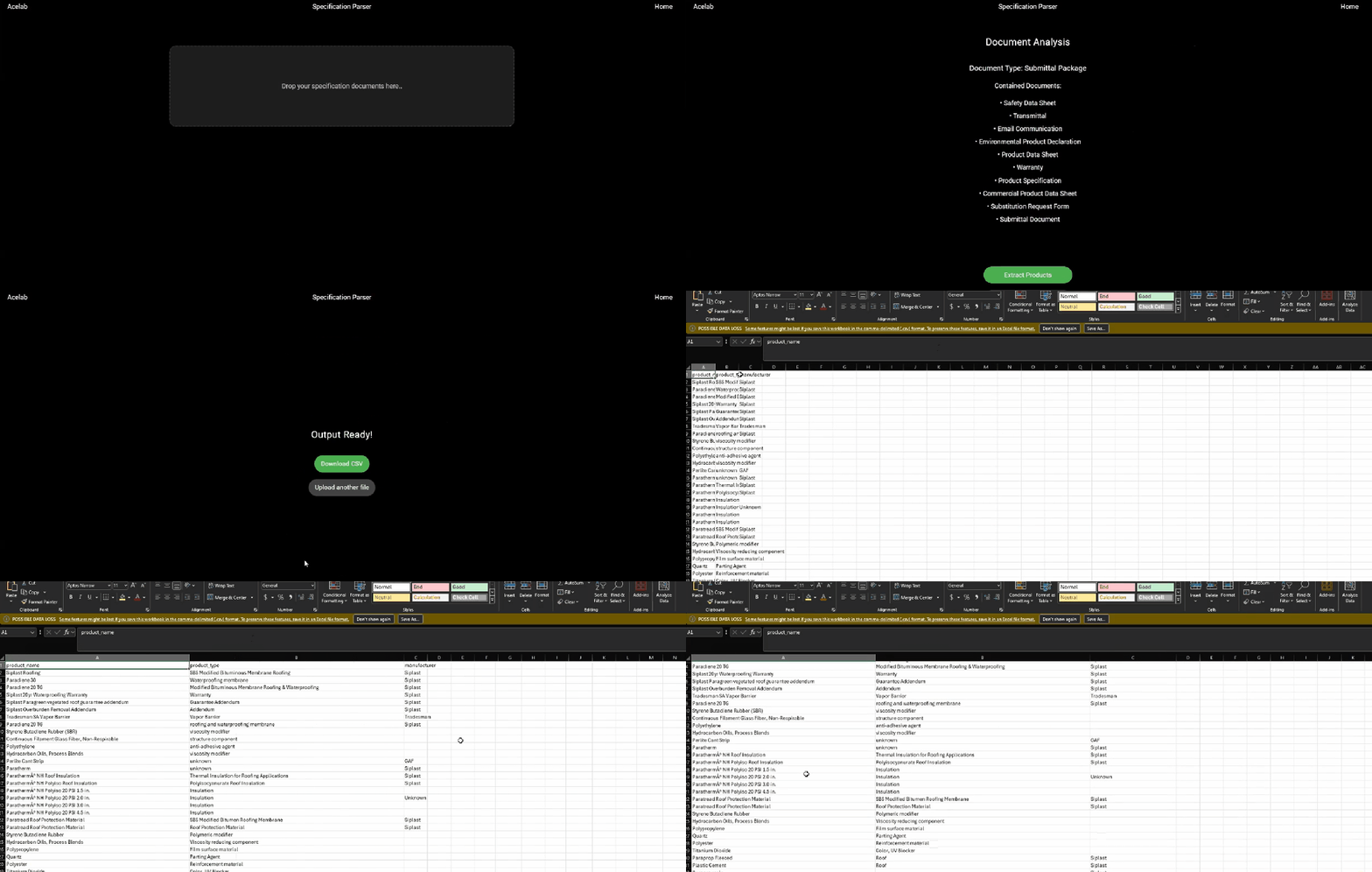
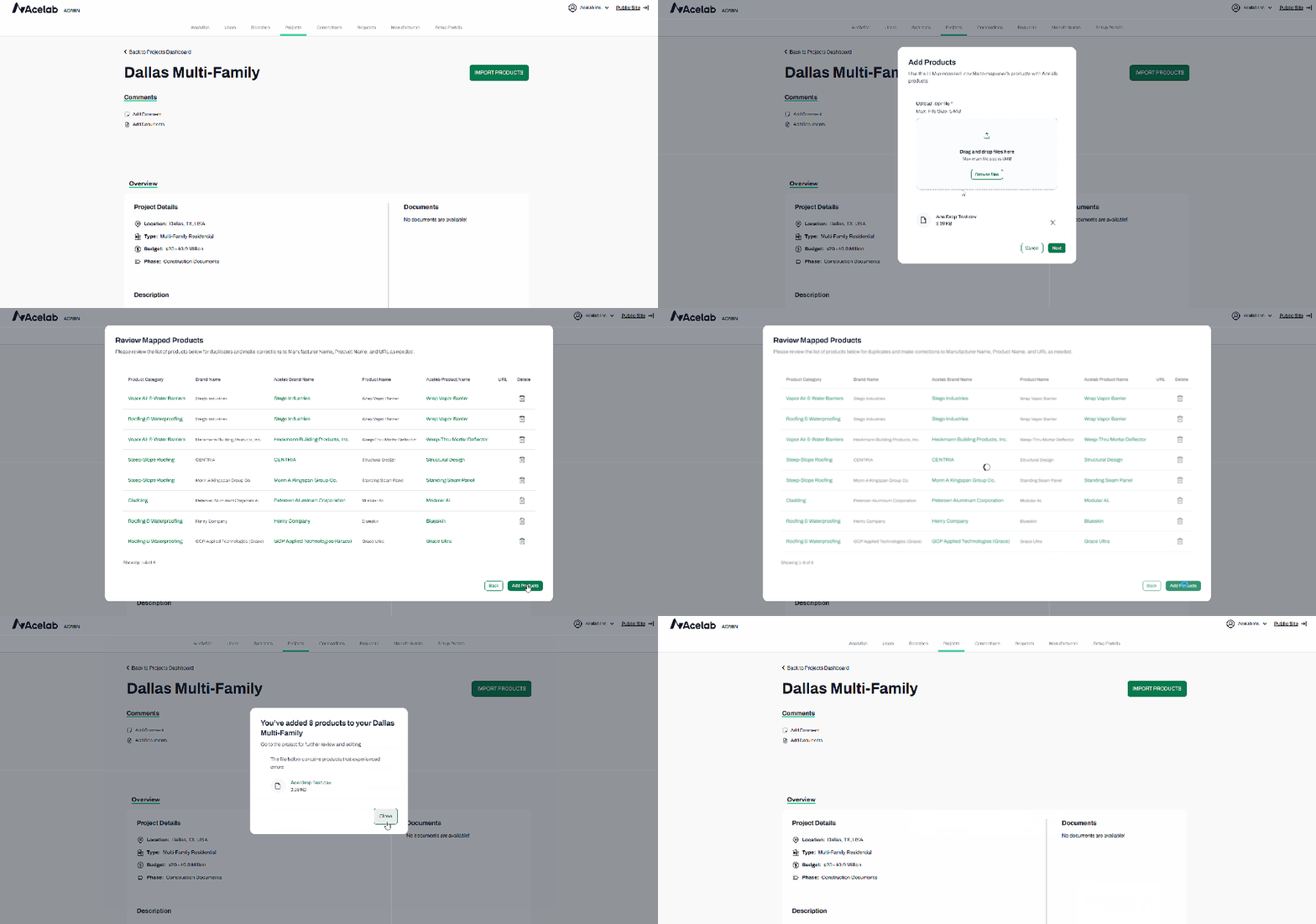
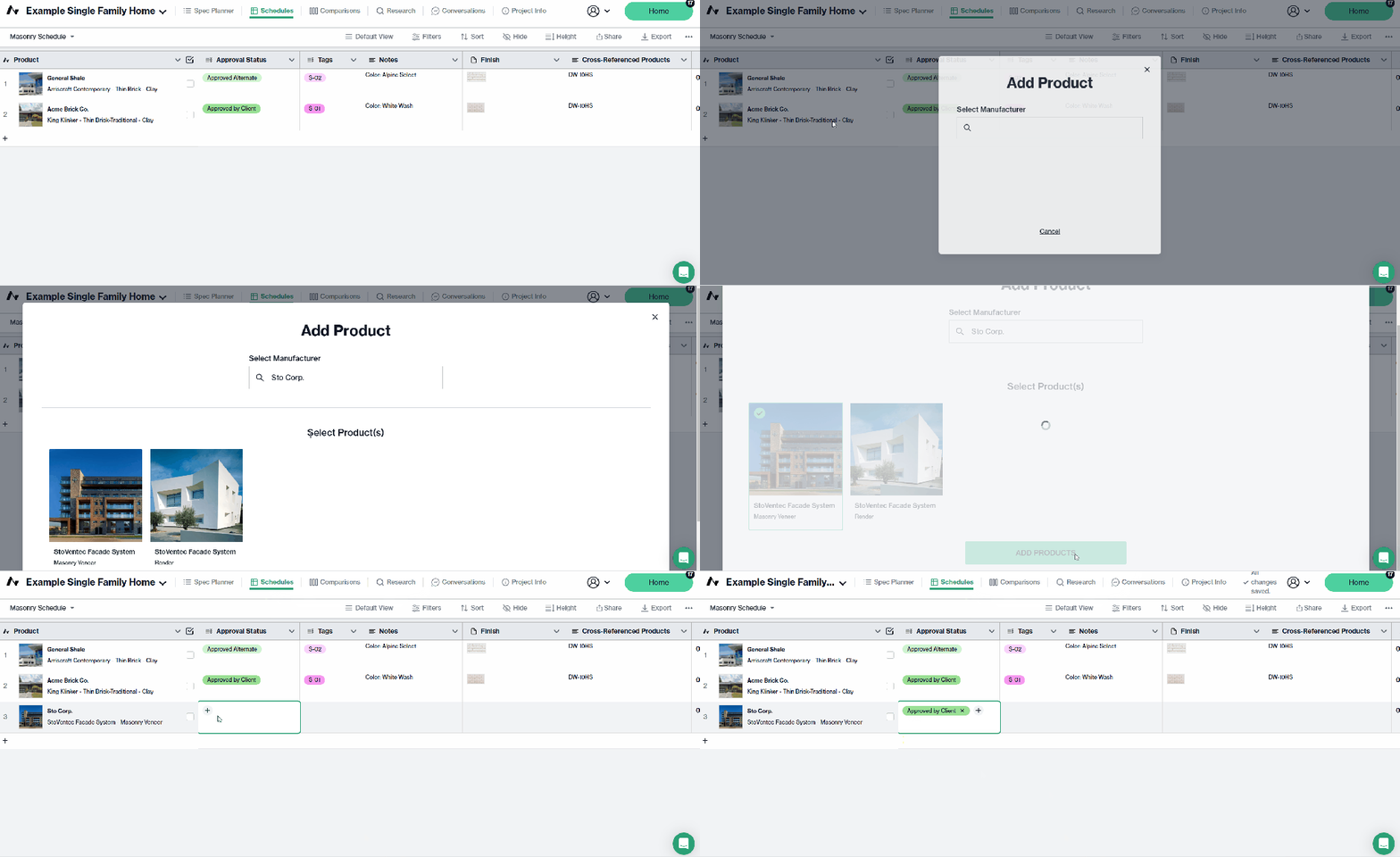
Material Hub demo of our internal upload tool, AceDrop, and its ability to import CSV files generated from SpecParser. Using fuzzy matching, AceDrop matches products to our internal cloud-based material database for bulk uploads to Firm Libraries. Designed by Maynak.
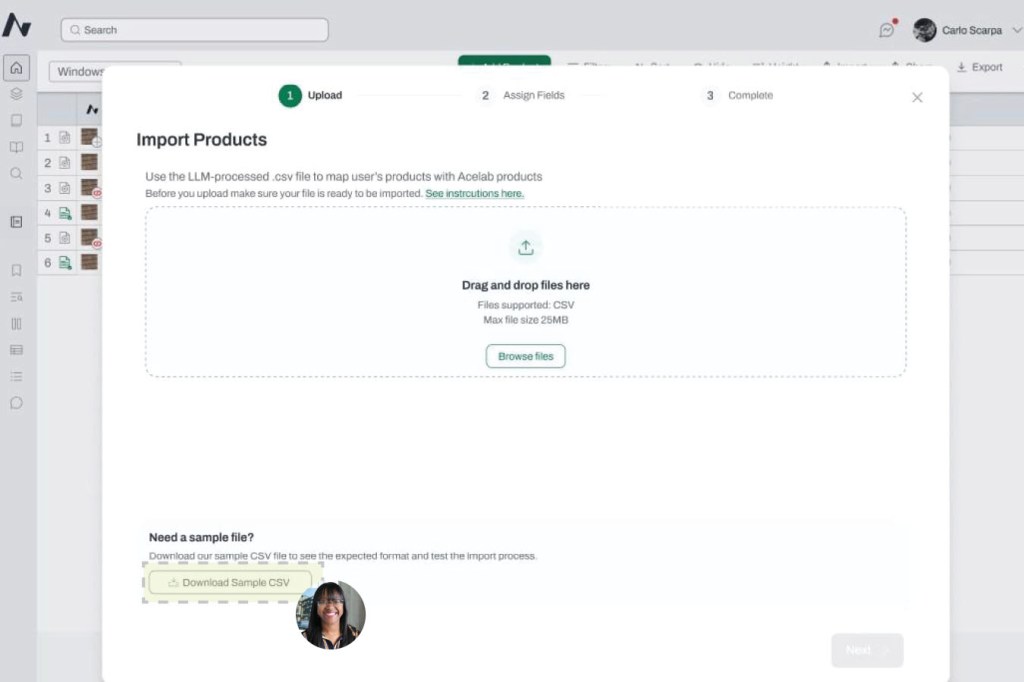
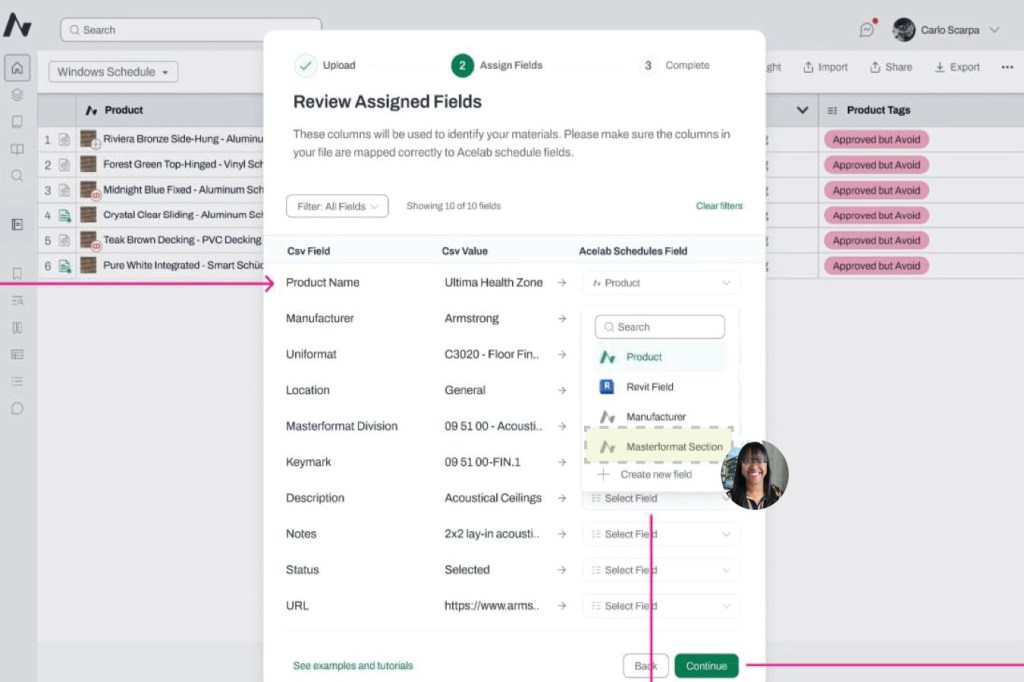
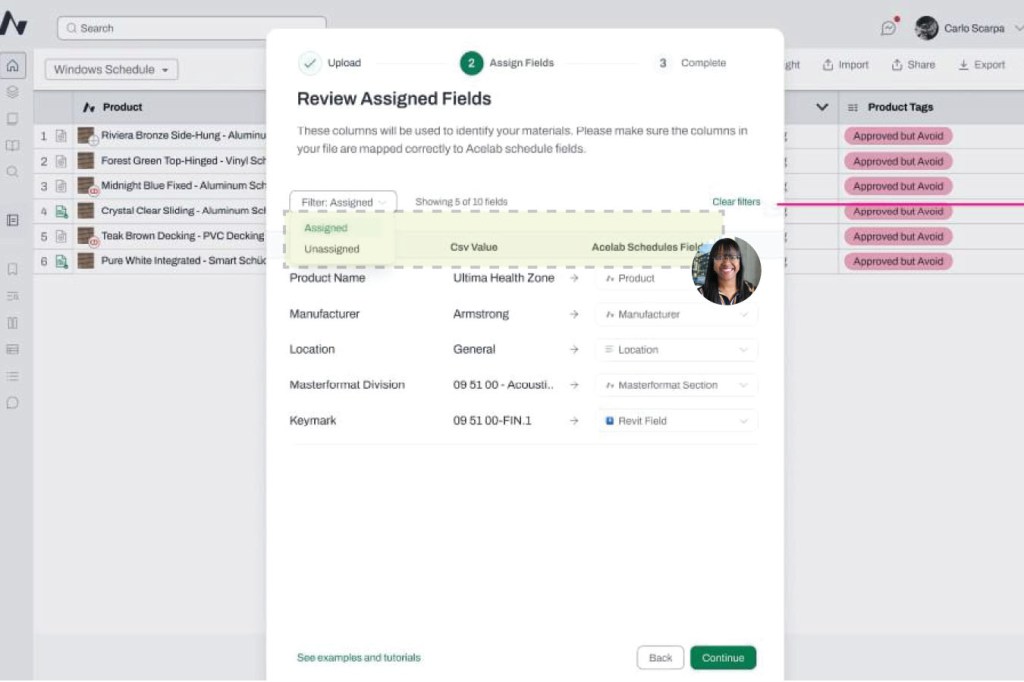
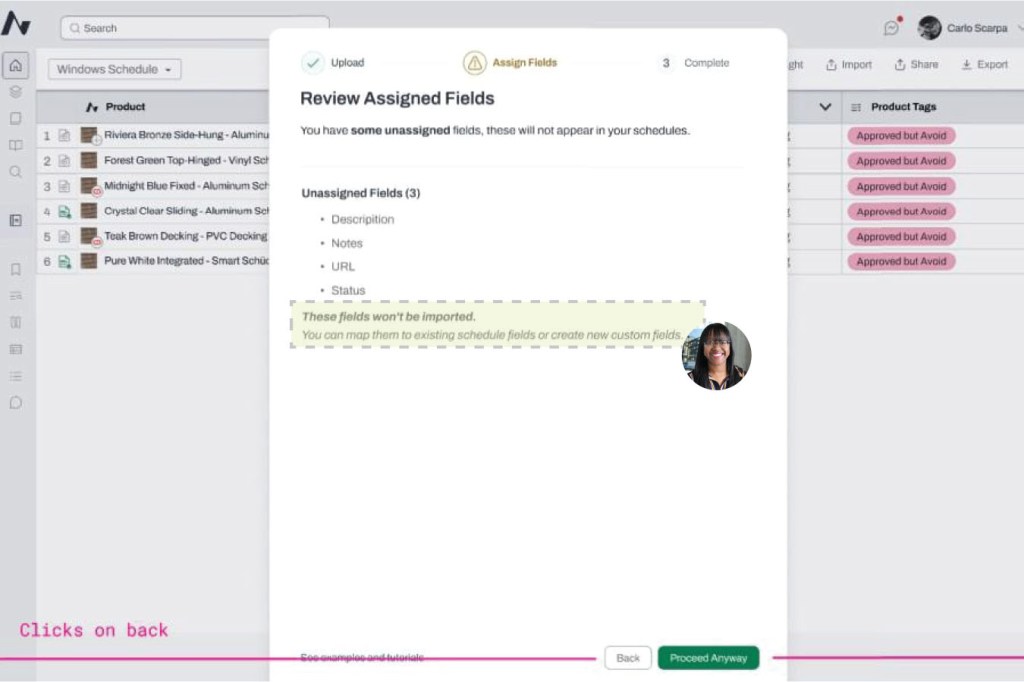
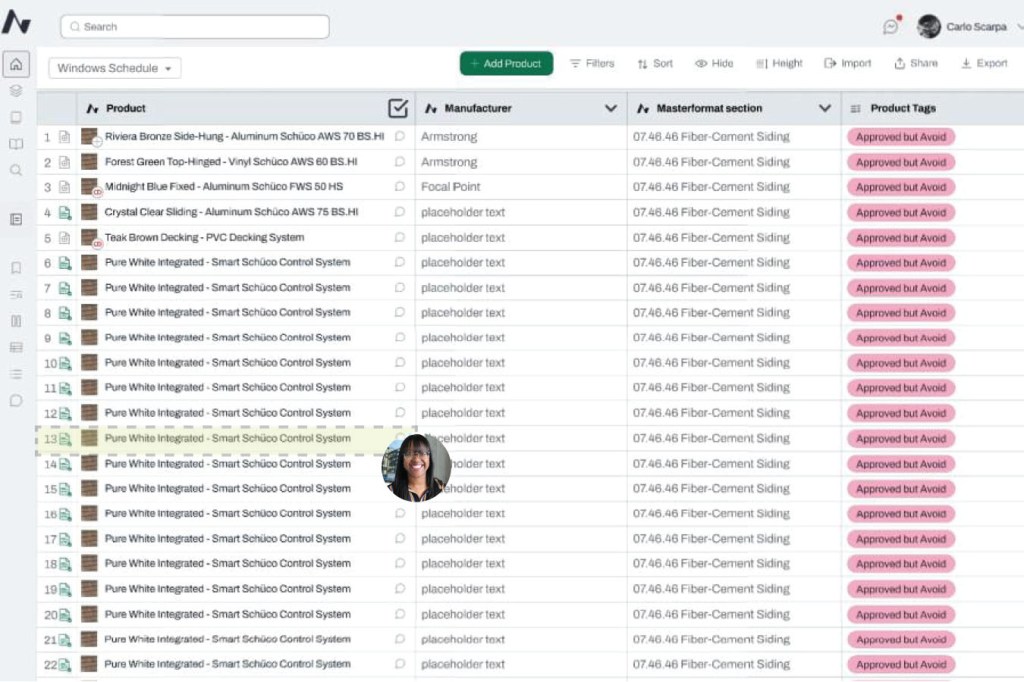
AceDrop V1 Redesign: AceDrop V1 marked a shift from a support-dependent admin import process to a user-driven workflow embedded within Schedules, reducing handoffs and improving ownership of the upload process.
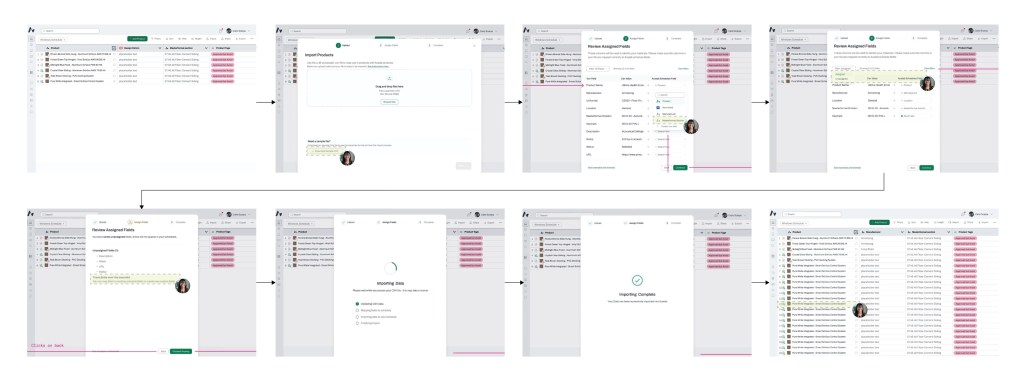
Design Review Feedback:
- Sample CSV Alignment with SpecParser
- Design Review Input: Discussed how the Sample CSV template should align with SpecParser output, including whether core columns such as Product Name, Manufacturer, and Category could be carried over or mapped.
- Design Feedback or Changes: Confirmed the Sample CSV will use a clean, standardized format without merged cells, styling, or formulas. Users may retain column headers of their choice; however, category mapping will not be supported in V1. Placeholder products will default to a “Product” category, requiring users to resolve categories post-import.
- MasterFormat Division Mapping
- Design Review Input: Raised the question of whether user-defined MasterFormat divisions included in the CSV could be mapped to existing database divisions, with a fallback for legacy or non-matching entries.
- Design Feedback or Changes: Agreed to evaluate division mapping as part of a V2 exploration to determine feasibility of matching user-provided divisions to existing database values.
- Review Assigned Fields Module Language
- Design Review Input: Identified that the header language within the “Review Assigned Fields” module was unclear and potentially confusing for users.
- Design Feedback or Changes: Aligned on simplifying header terminology, including revisiting language such as “CSV Value” to fields to improve clarity.
- Confirmation Step Flexibility
- Design Review Input: Flagged concerns that the confirmation step appeared final, requiring users to restart the entire import process if changes were needed post-upload.
- Design Feedback or Changes: Acknowledged this limitation as a V1 constraint. The team agreed to revisit post-upload editing capabilities after the initial launch.
- Batch Upload Placeholder Data
- Design Review Input: Noted that batch upload placeholders currently only include Product Name and Manufacturer, and questioned whether available product URLs could be included at creation rather than added manually later.
- Design Feedback or Changes: Confirmed that including product URLs during batch upload is feasible and agreed to incorporate this into V1 pending engineering alignment.
SpecParser & AceDrop: Improving Data Accuracy and Workflow
As Director of Material Research on the CX-AECO team, I led user feedback analysis on two internal tools I originally helped conceptualize: SpecParser (an AI-driven data extraction tool) and AceDrop (a bulk upload and matching system). Both tools play a key role in how Acelab processes architectural specifications and populates firm libraries with accurate, structured product data.
This study identifies key usability gaps and outlines proposed solutions to improve data accuracy, workflow efficiency, and user control during bulk product uploads.
SpecParser:
- Problem: Missing MasterFormat Coding
- Observation: SpecParser currently does not capture the MasterFormat division where products are located within architectural specifications, creating gaps in product categorization in the schedules.
- Impact: Without MasterFormat division data, the Library Implementation Team must manually review specifications to identify and assign codes, which slows down project setup and increases the time required to complete firm library implementations.
- Proposed Solution: Enhance SpecParser to automatically detect and include MasterFormat divisions in the CSV export used for bulk imports.
- Problem: Low Product Mapping Accuracy
- Observation: The tool currently maps about 30% of Acelab products to our 100,000+ product database, but with only ~10% accuracy. Discrepancies arise from how firms label manufacturers and products (abbreviations, discontinued lines, brand acquisitions, or missing records).
- Impact: Low accuracy increases manual review time and reduces confidence in AI-generated mappings.
- Proposed Solution: Continue training the model using a larger sample of firm specifications to improve fuzzy-matching precision. As database coverage expands, both match quantity and accuracy will increase.
AceDrop:
- Problem: No Session Saving
- Observation: Users cannot save progress during bulk uploads, even when reviewing datasets of 500–1,000+ products.
- Impact: Sessions must be completed in one sitting, leading to fatigue, rework, and inconsistent review accuracy.
- Proposed Solution: Introduce a session-saving feature that preserves reviewed progress and allows users to bulk-load approved items for import.
- Problem: Limited Editing Controls
- Observation: Users cannot correct incorrect Acelab matches directly within the tool.
- Impact: Mistakes require manual reprocessing outside the system, increasing workload and reducing trust in automation.
- Proposed Solution: Add an editable verification step allowing users to confirm or revise manufacturer and product names. A “match confidence” percentage can highlight which records are likely accurate and which require review.
- Problem: Incomplete Placeholder Workflow
- Observation: The SpecParser CSV cannot be edited to include product URLs for hyperlinking placeholders during import.
- Impact: Users must manually re-enter data for unmapped products, limiting efficiency and completeness.
- Proposed Solution: Enable URL fields in the SpecParser CSV import so users can bulk-create placeholders for products not yet in Acelab’s database.
Outcome:
These UX feature recommendations will:
- Improve data accuracy and consistency across SpecParser and AceDrop workflows
- Reduce manual corrections and rework
- Enhance user confidence in AI-driven mapping
- Increase the scalability of Acelab’s product data operations
Current Project Status: The project is well underway, with Materials Hub launching in March 2025. This platform will incorporate updated features, including the beta product developed by the Engineering team that covers S1 (Data Breakdown) and S2 (Smart Extraction). Currently, I am overseeing the accuracy of these components as they continue to develop. Meanwhile, the Data team is working on S3 (Database Sync) and S4 (Automated Upload), while my team focuses on S5 (Tailored Customization) to ensure that the final library is customized to each client’s specific needs. This phased approach allows us to continuously refine and improve the process, ensuring that by the time the full system is live, it will be both efficient and highly functional.

 ALEXIS J MALONE